

Was there a time that when you scroll through your Instagram feed and you just want to share a certain post? But once you want to do it, there is no option for it? Unlike with Twitter and Facebook, it’s easy to retweet and share a post. Posting someone else’s post on Instagram is called reposting, and it can’t be done directly through the app.
In order to repost something on Instagram, you must first reach out to the Instagram user whose content you want to repost for permission. This is in compliance with Instagram’s Term of Use. An easy way to get a person’s permission is to comment on that post and ask if you can share that image or video. The other one is to Direct Message on Instagram.
Benefits
User-Generated Content
Through reposting, you can promote your own products or service by using the photos posted by another Instagram user who used your brand or avail of your service. You are building trust and strengthening the community among your followers because you are being real and authentic on promoting your brand. And, followers who’ll interact with UGC content are most likely will become your customers which in result, you will see sales to arise!
Reduce Need To Create Own Content
This allows you to save time and effort in thinking of adding new content for your account especially when you ran out of ideas. Also, reposting is one way of breaking from monotony on your Instagram profile.
How to Repost
After obtaining permission from an Instagram user, you can repost by taking a screenshot of the photo or you can use external apps such as Repost for Instagram.
Take a Screenshot
The most obvious and simple way of reposting is to take a screenshot of the post and upload it on your own profile. The downside of using the screenshot in the photo, it includes the person’s username, caption, their likes and comments of the post. If you don’t want it to be seen, then you’ll have to crop it. But cropping the photo can affect the image quality. Also, for screenshots, it doesn’t work with videos but only for sharing photos.
Using “Repost for Instagram”
1. Download Repost
Download “Repost for Instagram” for either iOS or Android, which integrates directly with Instagram so you can share from other users.

2. Identify a photo or video to repost
You can now choose a photo or video that you want to repost from your Instagram account. Tap the chosen photo or video to see its full view.
3. Copy the post’s share URL to your clipboard
Once you’re on the photo’s or video’s landing page, tap the “…” icon in the upper-righthand corner of the post. Then, tap “Copy Share URL” (or “Copy Link”).
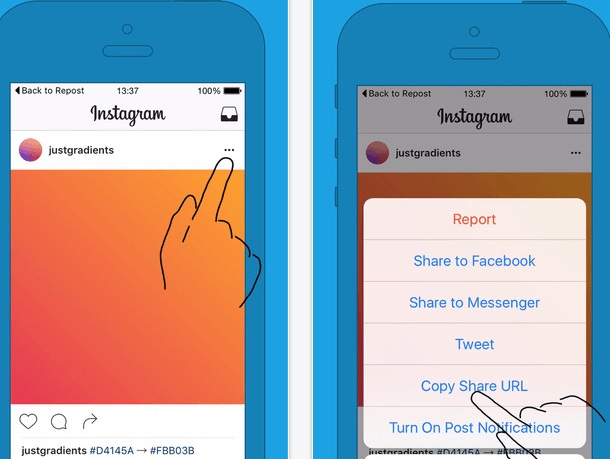
4. Open “Repost for Instagram”
Once the photo is copied to your phone’s clipboard, you can now open Repost. The post that you copied will automatically be on the app’s homepage.
Tap the arrow on the righthand “>” side of the post, then you’ll be able to edit on how you want the repost icon to appear on Instagram.

Tap “Repost”.
Tap “Copy to Instagram”, so you can add a filter and edit the post.
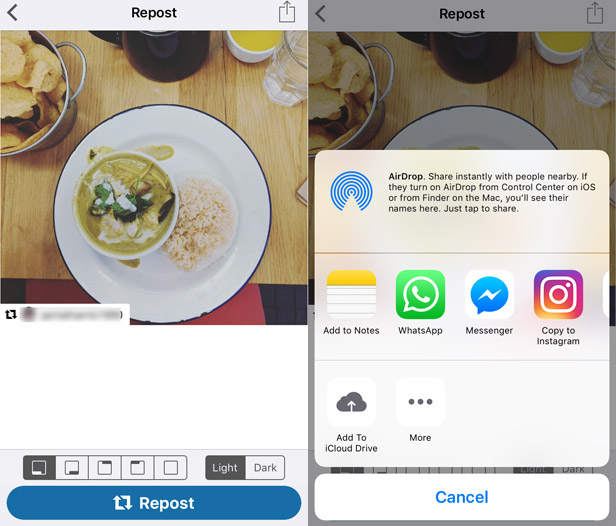
5. Edit the post’s caption and share
After adding a filter, you can tap “Next” to add a caption. If you want to use the original caption of the post, tap the caption field and press “Paste” and the original caption will appear with a citation that credits the original user of the photo. Tap “Share” once you are done.
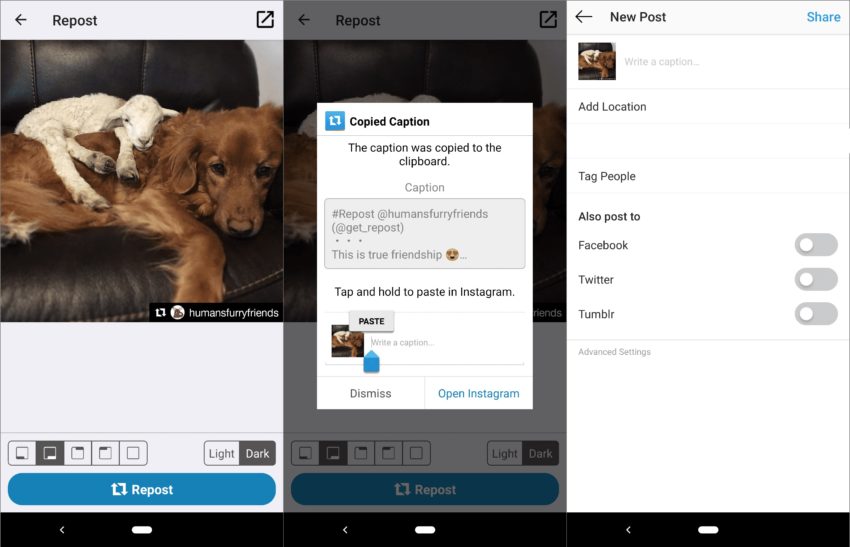
There are other apps that you can use on reposting for Instagram such as InstaRepost, DownloadGram, and Regrammer which are the most commonly used apps for reposting.
Now, you know how to repost Instagram’s photos or videos and you can choose which app that is convenient for you to use. Remember that Instagram requires you to ask permission from the user to be safe in following Instagram’s Term of Service.
Instagram is a great way to connect with a larger audience and reposting content has a great impact on getting more engagement and potential customers for your business.





5 Responses
It was interesting to read this text about Instagram’s restrictions on reposts. In fact, many users find it difficult to understand why they can’t just click the “share” button, like on Twitter or Facebook. I liked that they emphasize the importance of following the rules and getting permission from the content creator — it’s a very ethical approach and helps avoid copyright issues.
It also occurred to me that for organizations or small businesses, such restrictions on social media can be a problem if they want to share content quickly. In this case, you can look into services that help you manage communication effectively and automate processes, such as MightyCall. The website more information provides detailed information about different approaches to handling calls in business, which may be useful for those looking for alternative ways to interact with customers and automate processes.
Reposting on Instagram is a useful way to share valuable content and build community, but it’s important to always respect creators by asking for permission first and giving proper credit. Smash Karts
AI Photo Remove tools use artificial intelligence to remove unwanted people, objects, text, or distractions from photos with precision. They automatically reconstruct the background, blend textures seamlessly, and deliver clean, natural-looking images while preserving the original quality.
Great tips for sharing Instagram content the right way doodle jump. Giving proper credit and respecting creators is key to building trust while growing your brand presence.
Students studying algebra, geometry, and coordinate systems may find Slope Calculator very useful. It may be used to review homework responses, practice arithmetic problems, or get a deeper comprehension of the connection between lines and points.
slope calculator